
How to Build Production-Ready AI Agents: A Complete Deployment Guide
Building an AI agent that works in development is fundamentally different from deploying one that runs reliably in production. The gap between a proof-of-concept and a production system isn’t just about scaling—it’s about architectural discipline, observability, and the ability to handle edge cases that never appear in your test environment.
This guide walks through the complete deployment lifecycle for production AI agents, covering architecture patterns, testing strategies, monitoring requirements, error handling, and the operational practices that separate fragile prototypes from systems that run autonomously day after day.
Why Production AI Agents Fail
Before diving into solutions, it helps to understand what typically goes wrong. Production AI agents face pressures that development environments simply don’t simulate:
- Unpredictable inputs: Real-world data is messy, incomplete, and often contradictory—far removed from curated test datasets.
- LLM variability: Same prompts can produce different outputs across model versions, temperature settings, or even the same request under load.
- Tool failures: APIs rate-limit, databases time out, authentication tokens expire, and third-party services change without notice.
- State corruption: Agents that maintain persistent state can enter inconsistent conditions when external systems change unexpectedly.
- Cost explosion: Without proper guardrails, agents can generate unexpected token consumption through retry loops or inefficient tool calling patterns.
The agents that survive production aren’t necessarily the most sophisticated—they’re the ones designed with failure modes in mind from the start.
Architecture Patterns for Production Agents
The Supervisor Pattern
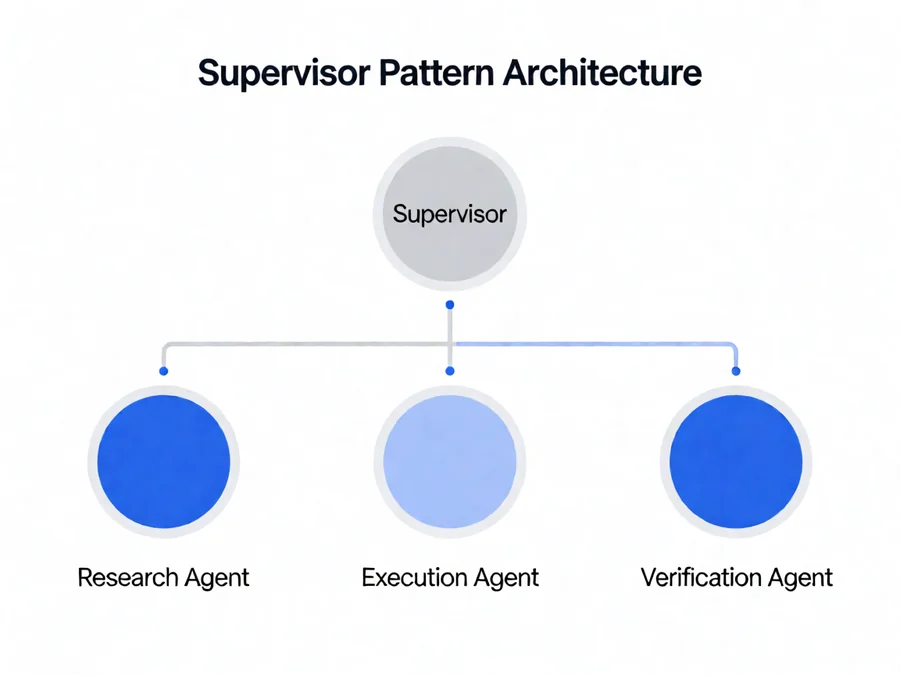
One of the most reliable patterns for production deployment is the supervisor architecture. Instead of letting a single agent handle an entire workflow, you delegate to specialized sub-agents managed by a central coordinator. This approach provides several production advantages:
- Isolation: When one sub-agent fails, the supervisor can retry, fallback, or escalate without restarting the entire workflow.
- Parallelism: Independent sub-tasks can execute concurrently, reducing total latency.
- Safety boundaries: The supervisor enforces policy checks before sensitive actions, creating a governance layer that single agents often lack.
- Auditability: Each sub-agent’s decisions and outputs are traceable, making debugging and compliance simpler.
For example, a customer support agent might delegate research to a knowledge retrieval sub-agent, draft responses to a writing sub-agent, and let the supervisor handle final review and approval routing.
State Management Strategy
Production agents must manage state carefully. Unlike stateless APIs, agents maintain conversation history, tool results, and intermediate reasoning that must persist across failures and retries.
Key state management principles include:
- Explicit checkpoints: Save agent state at meaningful decision points, not continuously. This reduces storage costs and ensures recovery from a known-good state.
- Immutable logs: Keep append-only execution logs that record every tool call, LLM response, and state transition. These are essential for debugging production issues.
- Graceful degradation: Design state that can be rebuilt from partial information rather than requiring complete restoration.
Testing Strategies for AI Agents
Testing AI agents requires a different mindset than traditional software testing. Because LLM outputs are probabilistic, you can’t always assert exact behavior—you need to verify properties, constraints, and outcomes.
Unit Testing Individual Components
Test each agent component in isolation:
- Prompt validation: Verify that prompts produce structured, parseable outputs across expected input ranges.
- Tool contracts: Mock external services and verify that agents handle success, failure, timeout, and partial-response cases correctly.
- Reasoning chains: Test that intermediate reasoning steps follow logical paths and don’t hallucinate unsupported conclusions.
Integration and Contract Testing
Beyond unit tests, you need integration tests that validate the agent’s behavior within its actual operational context:
- End-to-end workflows: Run complete agent tasks against real or realistic service endpoints to verify the full pipeline.
- Contract tests: Define expected input-output contracts for each tool and validate that the agent respects those boundaries.
- Edge case catalogs: Maintain test suites that cover known failure modes—empty inputs, malformed responses, permission denials, rate limits.
Evaluation Metrics
Production agents should be evaluated on measurable dimensions:
| Metric | What It Measures | Target |
|---|---|---|
| Task completion rate | Percentage of requests that reach a successful outcome | >95% |
| Latency p95 | 95th percentile response time for complete workflows | Under 30 seconds |
| Token efficiency | Tokens consumed per successful task outcome | Track trend, optimize downward |
| Error recovery rate | Percentage of transient failures handled without user intervention | >90% |
| Safety violation rate | Frequency of unauthorized actions or policy breaches | 0% |
Observability and Monitoring
Production agents generate rich execution traces that should be captured systematically. Without observability, debugging production issues becomes guesswork.
Structured Logging
Implement structured logging at every agent touchpoint:
- Request headers: Correlation IDs, user identifiers, session tokens, timestamp, and source system.
- Tool invocation logs: Arguments, response data, execution time, and any error conditions.
- LLM interaction records: Prompt templates used, token counts, response metadata, and sampling parameters.
- State transitions: Agent state changes with reasons and timestamps for audit trails.
Tracing and Debugging
Distributed tracing lets you follow a single agent execution across multiple services and tool calls. Look for:
- Span duration breakdowns to identify latency bottlenecks
- Error propagation paths to understand failure cascades
- Context windows that grow unboundedly, indicating memory leaks
- Retry patterns that suggest systematic tool or service instability
When production issues arise, trace data turns hours of investigation into minutes. The ability to reconstruct exactly what an agent saw, thought, and did is non-negotiable for operational confidence.
Alerting and Escalation
Set up alerts that trigger on actionable signals, not raw metrics:
- Task completion rate drops below threshold
- Latency percentiles exceed service-level objectives
- Error rates spike for specific tools or workflows
- Token consumption exceeds budget limits
- Unauthorized action attempts are detected
Error Handling and Resilience
Production agents must handle failures gracefully. The difference between a system that survives and one that collapses often comes down to error handling design.
Retries with Backoff
Implement exponential backoff for transient failures, but with bounded retry limits. Unbounded retries amplify problems rather than solving them. For each tool or service call:
- Classify errors: Distinguish between transient failures (rate limits, network timeouts) and permanent failures (authentication errors, permission denied).
- Set retry budgets: Limit total retries per tool call and per workflow execution.
- Use jitter: Add randomization to retry delays to prevent thundering herd effects when multiple agents retry simultaneously.
Fallback Strategies
When primary tools or models fail, fallback paths keep the agent functional:
- Model fallbacks: Switch to a different LLM provider or model when the primary choice is unavailable or produces poor outputs.
- Tool fallbacks: Use alternative tools or simplified operations when primary capabilities are impaired.
- Response fallbacks: Return cached or template responses when dynamic generation fails, preventing complete workflow stalls.
Circuit Breakers
Circuit breakers prevent cascading failures by stopping calls to failing services and allowing recovery time. Implement these for expensive or unstable dependencies:
- Open the circuit after N consecutive failures
- Allow probe calls after a timeout period to test recovery
- Close the circuit when success rates improve
- Fallback to degraded mode while circuits are open
Security and Compliance in Production
Production AI agents handle sensitive data and execute actions on behalf of users. Security must be baked in, not bolted on.
Secret Management
Never embed credentials in agent code or prompts. Use proper secret management:
- Environment variables: Load secrets at runtime from secure stores.
- Secret rotation: Automate credential rotation without agent redeployment.
- Access scoping: Grant agents the minimum permissions needed for their tasks.
- Audit trails: Log all secret access and usage for compliance review.
Prompt Injection Defense
Agents that process user input are vulnerable to prompt injection attacks. Defenses include:
- Input validation: Sanitize and validate all user-provided content before it reaches the LLM.
- Instruction separation: Clearly delineate system instructions from user input using structured formats.
- Output validation: Verify that agent responses conform to expected patterns before acting on them.
- Sandboxing: Execute untrusted operations in isolated environments with restricted permissions.
Data Governance
Ensure agents comply with data handling requirements:
- Data minimization: Only process and retain data necessary for the task.
- PII handling: Detect and protect personally identifiable information according to applicable regulations.
- Retention policies: Automatically purge agent memory and logs according to data retention schedules.
- Access controls: Restrict which users or systems can trigger agent actions and view execution results.
Deployment Strategies
How you deploy agents matters as much as how you build them. Consider these deployment approaches:
Canary Deployments
Gradually roll out agent changes to a small subset of traffic before full deployment. This lets you validate behavior in production without risking widespread issues.
Blue-Green Switching
Maintain parallel agent versions and switch traffic between them. If the new version exhibits problems, rollback is immediate by switching back to the previous version.
Feature Flags
Use feature flags to enable or disable agent capabilities without redeployment. This allows rapid response to production issues and gradual capability rollout.
Common Pitfalls and How to Avoid Them
Even experienced teams make the same mistakes when deploying AI agents. Here are the most common pitfalls and how to sidestep them:
| Pitfall | Consequence | Mitigation |
|---|---|---|
| Insufficient testing coverage | Undetected failures in production | Build comprehensive test suites including edge cases and failure modes |
| Ignoring cost monitoring | Unexpected token bills | Set budget alerts and implement token usage tracking |
| No human oversight for critical actions | Irreversible mistakes | Add approval gates for high-impact operations |
| Hardcoded model names or versions | Broken deployments when models change | Abstract model selection behind configuration layers |
| Inadequate error handling | Cascading failures and data loss | Implement comprehensive try-catch with fallback paths |
| Poor observability setup | Hours spent debugging production issues | Implement structured logging and tracing from day one |
Implementation Checklist
Before declaring an agent production-ready, verify each item on this checklist:
- Architecture: Supervisor pattern or equivalent isolation implemented
- State management: Checkpoints, logging, and recovery paths defined
- Testing: Unit, integration, and contract tests covering failure modes
- Monitoring: Structured logging, tracing, and alerting configured
- Error handling: Retries with backoff, circuit breakers, and fallbacks in place
- Security: Secret management, prompt injection defense, and access controls implemented
- Compliance: Data governance policies enforced and auditable
- Deployment: Canary or blue-green strategy ready for gradual rollout
- Cost controls: Token limits, budget alerts, and usage monitoring active
- Documentation: Runbooks for common failure scenarios and escalation procedures
Frequently Asked Questions
How do I know when an AI agent is ready for production?
An AI agent is production-ready when it has achieved consistent task completion rates above your threshold (typically 95%+), has comprehensive error handling and fallback mechanisms, includes full observability through logging and tracing, passes security review, and has been validated against a comprehensive test suite that includes edge cases and failure scenarios.
What’s the difference between an AI agent and a simple chatbot?
Chatbots primarily respond to user questions within conversational bounds. AI agents take actions—they call tools, make decisions, maintain state across interactions, and pursue goals autonomously. Agents require production engineering practices like error handling, monitoring, and security controls because they can modify external systems, not just generate text.
How do I handle agents that make costly mistakes?
Implement governance layers that constrain agent actions. Use approval workflows for high-impact operations, set spend limits and budget alerts, maintain audit trails of all agent decisions, and design rollback mechanisms that can undo unintended changes. Start agents in supervised mode where humans review outputs before actions are executed.
Should I use a single large agent or multiple specialized agents?
For production systems, multiple specialized agents coordinated by a supervisor typically outperform single monolithic agents. Specialized agents are easier to test, debug, and update independently. They also enable parallel execution and provide better isolation when failures occur. The tradeoff is increased architectural complexity, which is usually worth it for production reliability.
How do I monitor agent costs in production?
Track token consumption per agent invocation, set daily or monthly budget limits with alerts, implement cost-per-task metrics to identify inefficient workflows, and use caching to reduce redundant LLM calls. Regular cost reviews help you spot usage anomalies and optimize agent designs for efficiency.
Next Steps for Production Deployment
Deploying AI agents to production is a discipline that combines software engineering rigor with an understanding of probabilistic systems. Start with solid architecture, invest in testing and observability from day one, and treat security as a first-class concern rather than an afterthought.
The agents that succeed in production aren’t the ones with the most impressive capabilities—they’re the ones that handle uncertainty gracefully, recover from failures automatically, and provide the visibility engineers need to maintain confidence as systems scale.
Explore SmaugBrain for production-ready AI agent frameworks and deployment tools that implement these patterns out of the box.