
AI Agent MCP Integration: A Production Guide to Model Context Protocol
The Model Context Protocol (MCP) has emerged as the leading standard for connecting AI agents to external systems. Since Anthropic open-sourced MCP in November 2024 and donated it to the Linux Foundation’s Agentic AI Foundation in December 2025, the ecosystem has grown to over 10,000 active MCP servers and 500+ client platforms. For teams building production AI agents, understanding how to integrate MCP correctly is no longer optional — it’s a competitive necessity.
This guide covers everything you need to know about implementing MCP in production AI agent systems: architecture patterns, transport protocols, security considerations, common pitfalls, and real-world deployment strategies.
What Is the Model Context Protocol?
MCP is an open protocol that enables AI agents to discover and interact with external tools and data sources at runtime. Unlike traditional approaches where tool definitions are hardcoded into prompts or agent code, MCP provides a dynamic discovery layer.
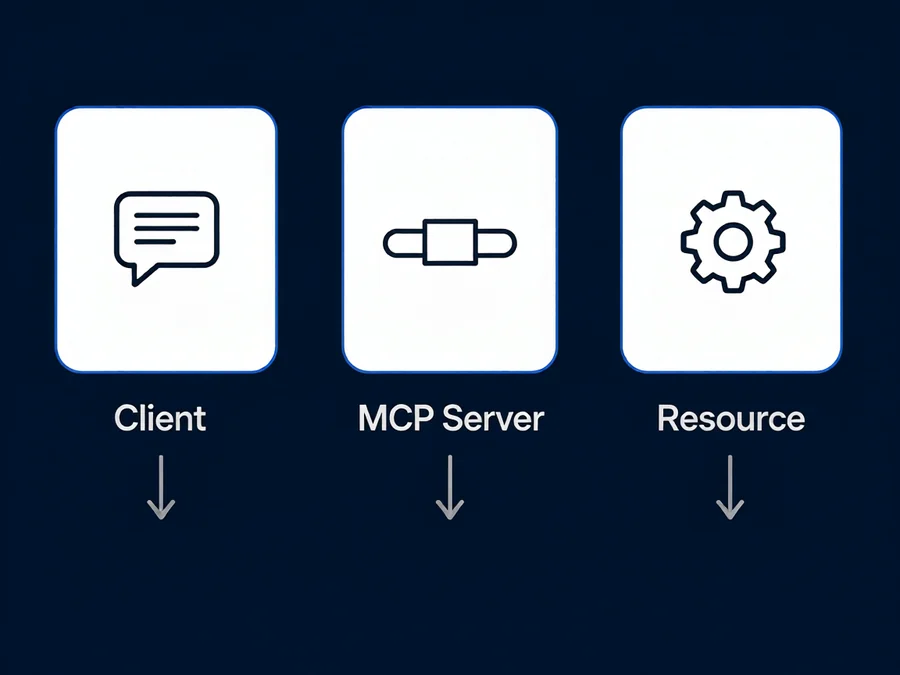
The protocol defines three core components:
**Host** — The AI application (like SmaugBrain, Claude, or ChatGPT) that orchestrates agent behavior and decides when to invoke tools.
**Client** — A component within the host managing a dedicated session with one MCP server. A single host can run multiple clients, each connected to a different server.
**Server** — An independently deployable service exposing capabilities as tools, resources, prompts, or sampling endpoints. Servers connect to databases, APIs, file stores, or enterprise applications.
After initialization, the client issues a `tools/list` request to discover available tools. Each tool returns a name, description, and input schema. The host aggregates tools from all active sessions into a unified registry. When a server’s tool set changes, it pushes a `notifications/tools/list_changed` event. The client re-fetches the list mid-session — no restarts, no redeployment.
Why MCP Matters for Production Agents
Before MCP, every agent integration required custom code. Connecting an agent to Slack, Notion, and a PostgreSQL database meant writing separate integrations, each with its own authentication and schema management. When any API changed, the agent broke and required redeployment.
MCP replaces this with shared protocol implementations. Teams with production MCP deployments report that adding new agents or expanding capabilities requires no integration rebuilds. Migrating ticketing platforms means updating the MCP server — the agent continues working unchanged.
MCP also introduces structured tool calls that create an observability layer. Every `tools/call` invocation is logged with parameters, return values, and timing — information traditional integrations rarely capture consistently. This audit trail is essential for debugging and compliance.
MCP Architecture: How It Works in Practice
The MCP workflow follows a predictable sequence:
For read-only operations, agents use `resources/list` and `resources/read` endpoints to access static data without triggering executable tool calls — important for security since read-only resources can be granted broader access.
Transport Protocols: Stdio vs. HTTP
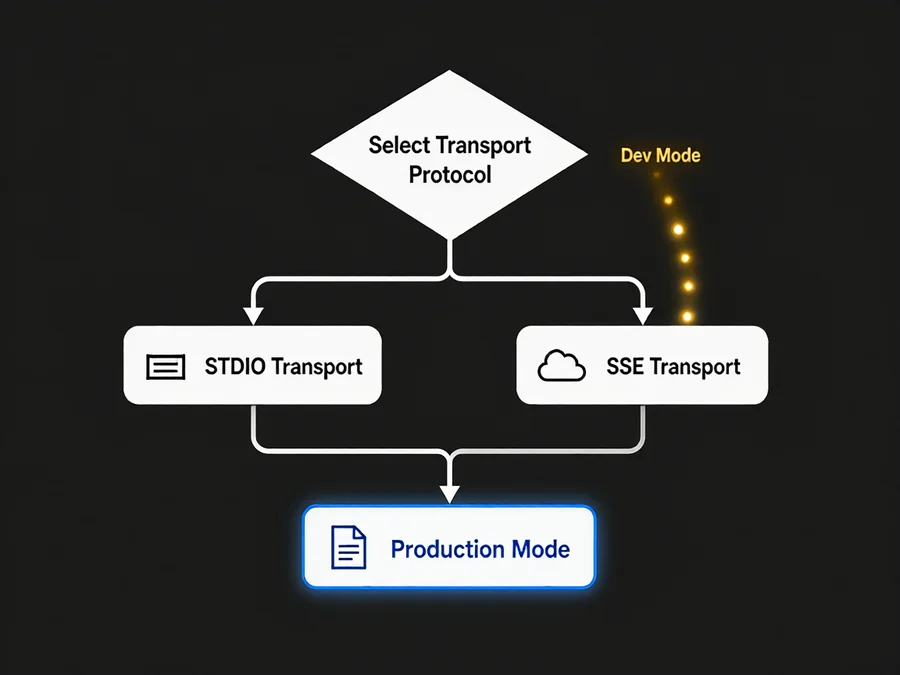
MCP supports two transport mechanisms, each suited to different deployment scenarios:
**Stdio Transport** — Communication through standard input and output streams. Simplest approach, ideal for local development and testing. MCP Inspector uses stdio by default. However, stdio does not scale horizontally and lacks built-in authentication — unsuitable for production multi-tenant environments.
**Streamable HTTP Transport** — Communication over HTTP with streaming support. The production-grade option enabling remote deployment, load balancing, TLS encryption, and OAuth 2.1 authentication. The MCP specification recommends HTTP for any deployment beyond local prototypes. AWS Bedrock AgentCore and enterprise MCP gateways all use HTTP transport.
When planning a production rollout, start with stdio for validation, then migrate to HTTP before any user-facing deployment.
Security Considerations for MCP in Production
MCP introduces a new attack surface that must be addressed before production deployment:
**Credential Isolation** — Never store API keys or secrets in the agent’s context. A trusted MCP gateway pattern keeps authentication material in a separate container. The agent container communicates with the gateway but cannot read the credentials it brokers. Write operations require scoped jobs that run only after threat detection passes.
**Scoped Tool Permissions** — MCP servers should expose only the tools an agent actually needs. A customer support agent might have read access to a knowledge base and write access to a ticketing system, but no access to billing APIs. Define permissions per-server, not per-agent, to avoid credential sprawl.
**Audit Logging** — Every `tools/call` request and response should be logged. This creates the traceability needed for post-incident analysis and compliance audits. Structured logging with tool name, parameters (sanitized), result, and timestamp is the minimum standard.
**Input Validation** — MCP servers must validate all inputs against the published JSON Schema before execution. Malicious or malformed tool parameters are the most common injection vector. Reject requests that don’t match the schema rather than attempting partial execution.
**Transport Security** — HTTP transport must use TLS in production. Stdio transport should only be used in trusted, isolated environments. Never expose an MCP server without authentication to an untrusted network.
Real-World MCP Integration Patterns
Three production patterns dominate successful MCP deployments:
**Pattern 1: The Gateway Architecture** — An MCP gateway container launches and manages multiple MCP servers. The agent container communicates exclusively through the gateway. This pattern, documented by GitHub for their agentic workflows, ensures the agent never directly holds authentication material. It’s the recommended approach for multi-server enterprise deployments.
**Pattern 2: The Toolbox Approach** — A single MCP server wraps multiple internal APIs behind a unified tool interface. This reduces the number of client connections the agent must manage and consolidates authentication, rate limiting, and monitoring in one place. Gentoro’s platform uses this pattern to serve B2C music platforms that need to coordinate Slack, Notion, and HubSpot actions through a single agent interface.
**Pattern 3: The Serverless MCP Deployment** — Perpetual sandbox platforms deploy custom MCP servers as serverless HTTP endpoints with built-in authentication, rate limiting, and observability. This eliminates server maintenance and scales automatically with demand. Teams with OpenAPI specs can use automated conversion tools to generate MCP servers directly from existing API documentation.
Common MCP Implementation Pitfalls
Even experienced teams encounter these issues when integrating MCP into production agents:
**Context Window Bloat** — When too many MCP servers are connected simultaneously, the aggregated tool definitions can fill the context window before the agent processes any user input. Mitigate this by loading only the servers relevant to the current task scope, and consider implementing tool filtering based on the agent’s current objective.
**Stateful Sessions Don’t Scale Horizontally** — MCP sessions are currently stateful by design. A single client maintains one session with one server. This doesn’t translate well to horizontal scaling across multiple agent instances. Plan for session affinity or implement a session management layer if you need to distribute load.
**Mid-Session Tool List Changes** — While MCP supports `notifications/tools/list_changed` events, not all client implementations handle mid-session updates correctly. Test tool discovery after server updates thoroughly. Some agents cache the tool list at initialization and miss subsequent changes.
**Over-Engineering Static Workflows** — Not every integration needs MCP. Direct API connections are more reliable and secure for fixed, deterministic workflows like invoice processing, lead routing, or employee onboarding. Use MCP where dynamic tool discovery and runtime composition provide genuine value — typically for agents that interact with diverse, evolving external systems.
Getting Started: A Practical Checklist
If you’re evaluating MCP for your production agent stack, follow this ordered checklist:
When to Skip MCP
MCP is powerful but not universally appropriate. Avoid MCP when:
For these cases, a direct API integration or framework-specific connector remains the simpler and more reliable choice.
The Future of MCP in Agent Production
The MCP specification reached version 2026-07-28 with experimental support for asynchronous task execution via MCP Tasks. This addresses one of the protocol’s most common production limitations: long-running operations that block the agent’s main thread. As the ecosystem matures, expect improved session management, native OAuth 2.1 support across more client implementations, and deeper integration with enterprise identity systems.
The Linux Foundation’s Agentic AI Foundation now oversees the protocol’s evolution. With contributions from major cloud providers, developer tool companies, and enterprise software vendors, MCP is positioned to become the default integration layer for production AI agents — similar to how REST became the default for web services a decade ago.
Conclusion
MCP represents a fundamental shift in how AI agents connect to the world around them. By replacing hardcoded integrations with a dynamic, discoverable protocol, it reduces maintenance burden, improves observability, and enables composability across agent systems. The transition from prototype to production requires careful attention to transport security, credential isolation, and context management — but the teams that navigate these challenges correctly will find that MCP pays for itself many times over in reduced integration engineering and faster time-to-value.
If you’re building production AI agents today, the question is no longer whether to adopt MCP, but how quickly you can move from your first test server to a production-ready gateway deployment.
Ready to build production-ready AI agents with SmaugBrain? Explore our platform at (https://www.smaugbrain.com/) and start automating your workflows with confidence.
Frequently Asked Questions
What is the difference between MCP and traditional API integration?
Traditional integration requires custom code for each endpoint and redeployment when APIs change. MCP provides runtime discovery via `tools/list` — when an API schema changes, the server updates automatically and the agent re-fetches the tool list without code changes.
Is MCP supported by SmaugBrain?
SmaugBrain supports MCP through its extensibility framework. Agents connect via stdio for development or Streamable HTTP for production. The skill system integrates with MCP-discovered tools alongside hand-built skills.
Can I use MCP with models other than Claude?
Yes. MCP is model-agnostic and works with any LLM that has an MCP client implementation, including SmaugBrain, OpenAI, Google Gemini, and open-source models. The protocol operates independently of the underlying model.
How do I debug MCP tool calls in production?
Use MCP Inspector for local debugging. For production, implement structured logging on every `tools/call` with tool name, parameters, result, and latency. Set up alerts for failures and anomalies.
What are the security risks of connecting an AI agent to my database via MCP?
Primary risks are credential exposure, overly broad permissions, and unvalidated inputs. Isolate credentials in a gateway container, limit tools to read-only where possible, validate all inputs against JSON Schema, and log every invocation. Never grant write access to production databases without human approval.
Should I use MCP for simple cron-job-style automations?
No. Direct API integration is more reliable for fixed workflows like invoice processing or scheduled exports. Use MCP where dynamic tool discovery and runtime composition provide genuine value — agents interacting with diverse, evolving systems. If your workflow has three fixed steps, a script is simpler.
How many MCP servers can a single agent connect to simultaneously?
No hard limit exists, but each server consumes context window space for tool definitions. Most production agents connect to 3–8 servers. Prioritize by task relevance and disconnect unused servers between task types.