
AI Agent Error Handling and Recovery: Building Resilient Production Systems
Production AI agents face errors constantly. Tools fail, LLMs return unexpected formats, APIs rate-limit, and network connections drop. Without robust error handling, these failures cascade into broken workflows and frustrated users. This guide covers practical error handling and recovery strategies for AI agent systems in production.
Why Error Handling Matters in AI Agents
Unlike traditional software where inputs are predictable, AI agents operate in probabilistic environments. The same prompt can produce different outputs across calls. Tools may be temporarily unavailable. LLM responses can be malformed or incomplete. These uncertainties require error handling strategies that go beyond simple try-catch patterns.
Consider a customer support agent that processes refunds. If the payment API returns an error, a naive implementation might fail silently or retry indefinitely. A resilient system recognizes the failure, attempts recovery through alternative paths, and surfaces meaningful status to the user. The difference between these approaches determines whether your agent feels reliable or fragile.
The Cost of Unhandled Errors
| Error Type | Business Impact | Recovery Complexity |
|---|---|---|
| Transient API failure | 1-2 second delay | Low — retry with backoff |
| LLM format mismatch | Invalid tool call | Medium — parse and retry |
| Persistent tool outage | Workflow stall | High — alternative path needed |
| Rate limit exceeded | Burst throttling | Medium — queue and defer |
| Security/rejection error | Hard failure | Low — fail fast, alert |
Understanding these categories helps you design appropriate handling strategies rather than applying blanket retries to every failure.
Core Error Handling Patterns
Exponential Backoff with Jitter
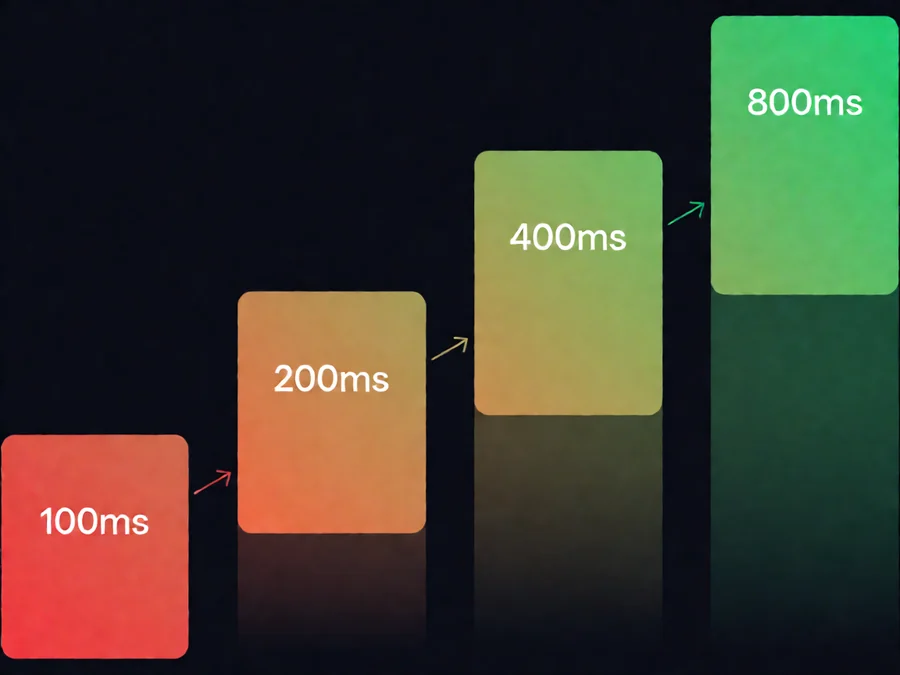
When tools fail transiently, immediate retries waste resources and can worsen rate limiting. Exponential backoff spreads retry attempts across increasing time intervals, while jitter adds randomness to prevent thundering herd problems when multiple agents retry simultaneously.
Start with a base delay of 100-500 milliseconds. Double the delay after each failure up to a maximum of 30 seconds. Add random jitter between 0 and the current delay value. Most production systems cap total retries at 3-5 attempts before escalating.
Circuit Breaker Pattern
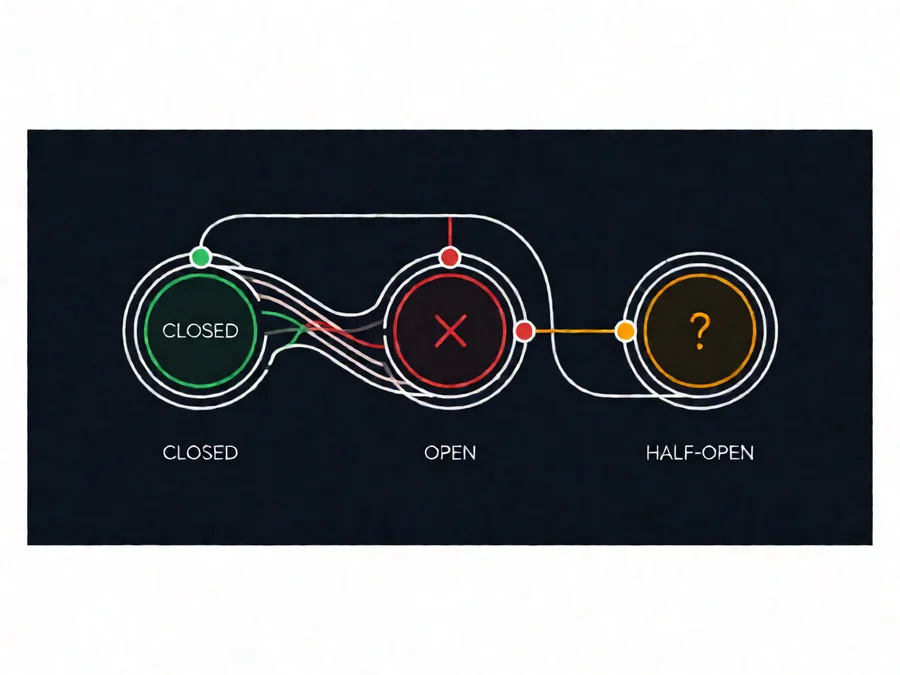
When a tool or API fails repeatedly, continued retries waste time and resources. Circuit breakers monitor failure rates and open the circuit after a threshold is crossed, immediately failing fast instead of attempting recovery.
Three states define the circuit breaker:
- Closed: Normal operation, requests flow through
- Open: Too many failures, requests fail immediately without attempting the tool
- Half-Open: After a timeout, allow a test request to probe if the service recovered
Set failure thresholds based on your SLA. A 50% failure rate over 10 requests might indicate a tool degradation worth investigating. The half-open state lets you detect recovery without waiting for manual intervention.
Fallback Chains
Single-point dependencies create single points of failure. Fallback chains maintain alternative implementations or data sources for critical operations. When the primary path fails, the agent attempts alternatives in priority order.
Example: A weather lookup agent might try OpenWeatherMap first, fall back to WeatherAPI if the primary rate-limits, then use a cached result if both external sources fail. Each fallback carries different guarantees — cache hits are stale but immediate, while secondary providers may have different data coverage.
LLM-Specific Error Handling
Response Validation
LLM outputs are probabilistic. Even with structured output prompts, parsers must handle unexpected formats gracefully. Validate responses against expected schemas before processing. When validation fails, log the actual output and decide whether to retry with a stricter prompt or escalate to a human.
Three validation levels protect against common failures:
- Structural validation: Check that required fields exist and match expected types
- Semantic validation: Verify values make sense within the domain (e.g., a temperature should be a number, not a string)
- Business rule validation: Confirm outputs satisfy constraints (e.g., refund amount cannot exceed original purchase)
Malformed JSON Recovery
When LLMs return truncated or malformed JSON, attempt recovery before full rejection. Common recovery techniques include closing unclosed brackets, escaping unescaped quotes, and extracting partial structures from surrounding text. Some agents use a secondary LLM call specifically to repair malformed outputs, trading latency for reliability.
Content Policy Failures
LLM content filters may reject otherwise valid prompts. Rather than failing entirely, analyze rejection patterns to adjust prompt phrasing. Create a dictionary of known rejection triggers and alternative phrasings. Log rejections separately from other errors to identify systemic prompt issues versus random filtering.
Tool Integration Resilience
Timeout Configuration
Every external tool needs appropriate timeouts. Short timeouts (5 seconds) suit simple lookups. Longer timeouts (30-60 seconds) accommodate complex operations like image generation or document processing. Configure timeouts per tool based on historical latency percentiles, not averages, to account for tail latency.
Permission and Auth Errors
Authentication failures differ from transient errors. When a tool reports invalid credentials or expired tokens, do not retry — retrying will fail identically. Instead, surface the authentication error to the user or system administrator immediately. Implement token refresh flows for OAuth-based integrations where possible.
Recovery Strategies
Semantic Retry vs. Blind Retry
Blind retries repeat the same failed operation expecting different results. Semantic retries modify the approach based on error context. When a tool returns a validation error, retrying with the same input wastes time. When a tool returns a timeout, retrying with adjusted parameters (longer timeout, smaller payload) has higher success probability.
Classify errors before deciding whether to retry. Transient errors (timeouts, connection refused, 5xx responses) merit retry. Permanent errors (400 bad request, 401 unauthorized, 403 forbidden) require alternative handling.
Checkpoint and Resume
Long-running agent workflows benefit from checkpointing. Save progress after each completed step so failures restart from the last success point rather than beginning entirely. This is particularly valuable for multi-step processes like document generation pipelines or data aggregation workflows spanning dozens of tool calls.
Graceful Degradation
When full functionality is unavailable, provide partial value rather than complete failure. An agent that cannot fetch real-time data might serve cached results with freshness timestamps. One that cannot generate custom content might fall back to templated responses with a clear disclaimer about limitations.
Monitoring and Alerting
Error Taxonomy
Categorize errors systematically for effective monitoring. Track error rates by type (transient, permanent, validation, security), by tool, and by severity. Dashboards showing error rate trends help distinguish between increased load (more absolute errors but stable rate) and genuine degradation (increasing error rate).
Mean Time to Recovery
Measure how long errors persist before recovery. Time-to-recovery includes detection latency, decision time, and execution time. Automated retries reduce detection and decision time. Circuit breakers and fallback chains reduce execution time by providing immediate alternatives.
Failure Mode Documentation
Maintain a living document of known failure modes and their handling. When new error patterns emerge, add them to the taxonomy with response procedures. New team members and automated on-call systems benefit from consistent responses to familiar error types.
Implementation Checklist
| Component | Recommendation | Priority |
|---|---|---|
| Retries | Exponential backoff with jitter, 3-5 max attempts | Required |
| Circuit breakers | Per-tool open/half-open thresholds | Required for external tools |
| Timeouts | Configured per-tool based on P99 latency | Required |
| Validation | Schema + semantic checks on LLM outputs | Required |
| Fallbacks | Alternative tools or cached data | High for critical paths |
| Checkpoints | Save state after each logical step | High for long workflows |
| Error logging | Structured logs with error classification | Required |
| Alerting | Thresholds on error rates and recovery time | High |
FAQ
How many retry attempts are too many?
More than 5 retries rarely succeeds and often indicates a permanent failure. Each retry consumes tokens, time, and potentially worsens rate limiting. If retries exhaust, move to fallback or error handling rather than continuing to retry.
Should I retry on 400 Bad Request errors?
No. 400 errors indicate the request itself is invalid, not that the service is temporarily unavailable. Retrying identical 400 requests wastes resources. Instead, validate your input and fix the request or escalate the error.
How do I distinguish transient from permanent failures?
Transient errors typically return 5xx status codes, timeout messages, or connection refused responses. Permanent errors return 4xx status codes, validation messages, or authentication failures. Check the error message content and status code together for classification.
What happens when all fallbacks fail?
When every recovery path is exhausted, fail gracefully. Return a clear error message to the user explaining what failed and what options exist. Log the complete error chain for debugging. Consider implementing a dead letter queue to track permanently failed operations for later review.
How do I test error handling without real failures?
Use chaos engineering principles: inject faults into your test environment by blocking network requests, returning error responses, or simulating timeouts. Test your retry logic, circuit breakers, and fallback chains in controlled conditions. Most testing frameworks support HTTP interceptor patterns for simulating failure scenarios.
Can error handling introduce security risks?
Yes. Overly verbose error messages can leak internal implementation details. Retry logic without rate limiting can enable denial-of-service attacks. Always sanitize error messages before exposing them, implement rate limiting on retries, and never log sensitive data in error traces.
How should AI agents handle partial successes?
When a multi-step workflow completes some steps but fails on others, save progress from completed steps and resume from the failure point rather than starting over. This requires checkpointing and idempotent operations where re-executing completed steps produces the same result.
Conclusion
Building resilient AI agents requires layered error handling: immediate retries for transient failures, circuit breakers to prevent cascade failures, fallback chains for critical operations, and graceful degradation when full functionality is unavailable. Monitor error patterns continuously and refine handling strategies based on production experience. The agents that feel reliable in production share one characteristic: they fail visibly, recover automatically, and learn from failures to improve future performance.