
# AI Agent Tool Use and Function Calling: A Production Guide
Artificial intelligence agents are only as capable as the tools they can wield. Raw language model outputs are impressive, but real production systems require agents to interact with APIs, query databases, execute commands, and coordinate with external services. This is where **tool use** — also known as **function calling** or **tool calling** — becomes the defining capability of a production-grade AI agent.
In this guide, we explore what tool use actually means in practice, how it differs from simple prompt engineering, and how to architect reliable tool-calling systems that survive production pressure. We cover implementation patterns, failure modes, security considerations, and practical strategies for building agents that use tools effectively.
## What Is Tool Use in AI Agents?
Tool use refers to an agent’s ability to invoke external functions or APIs through structured requests. Instead of generating text alone, the agent produces structured output that specifies which tool to call and with what arguments. The system then executes that tool and feeds the result back into the agent’s context.
This creates a loop: the agent observes its environment, decides which tool might help, calls it, observes the result, and iterates until the task is complete. This is fundamentally different from a chatbot that simply generates responses — an agent with tool access can *do* things.
Modern LLM providers expose tool use through standardized interfaces. OpenAI’s function calling, Anthropic’s tool use, and the emerging OpenAI-compatible APIs all follow similar patterns: the model receives a schema describing available tools, outputs a structured tool call when appropriate, and receives the tool’s response to continue reasoning.
## Why Tool Use Matters for Production Agents
Simple prompt-based agents hit a ceiling quickly. They cannot access real-time data, they cannot perform calculations beyond their training cutoff, and they cannot interact with the systems your users actually rely on. Tool use breaks through these limitations.
Consider a customer support agent. Without tools, it can offer generic advice based on training data. With tools, it can look up order status, check inventory levels, process refunds, and escalate to human agents — all within a single conversational flow. This transforms the agent from an information source into an operational system.
For business automation, tool use is even more critical. Agents that can read emails, update spreadsheets, create calendar events, and trigger workflows are dramatically more valuable than agents that can only generate text. The difference between a novelty and a production system is often just the quality of its tool integrations.
## How Tool Calling Works: The Architecture
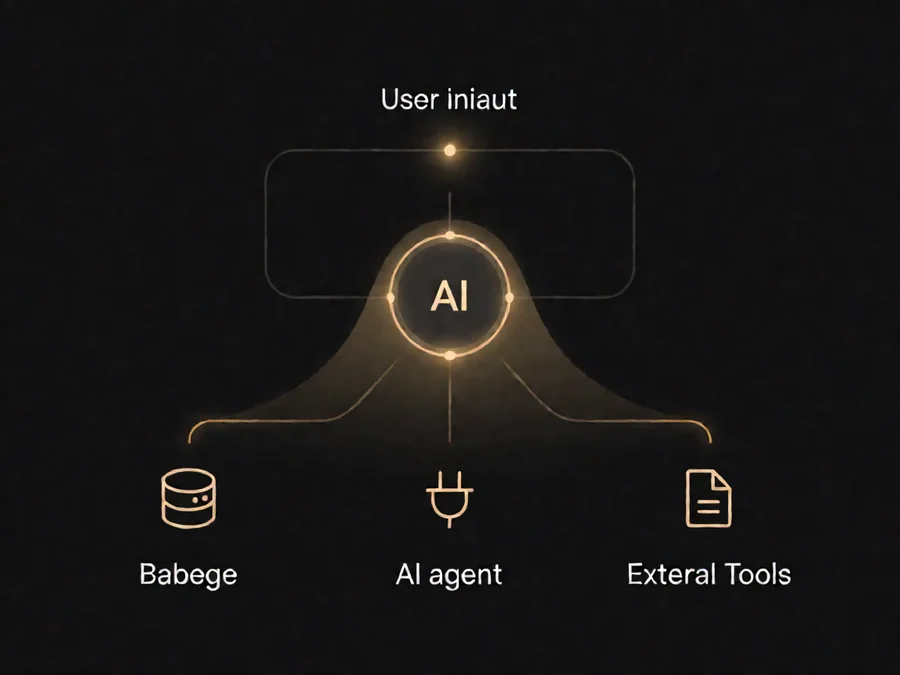
Understanding the architecture behind tool calling helps you build better systems. Here is the typical flow:
**Step 1: Tool Registration.** The system defines available tools with their names, descriptions, and parameter schemas. These schemas are sent to the LLM alongside the conversation history.
**Step 2: Model Decision.** The LLM analyzes the user request and determines whether tool use is necessary. If so, it produces structured output specifying the tool name and arguments.
**Step 3: Tool Execution.** The application code receives the tool call, validates arguments against the schema, executes the tool, and captures the result.
**Step 4: Context Injection.** The tool result is fed back into the conversation as a system message or tool response, and the LLM continues reasoning.
**Step 5: Iteration.** The agent may make additional tool calls, each time building on previous results, until it produces a final response.
This loop can repeat many times. Complex tasks might involve dozens of tool calls — searching a database, processing results, making another query, formatting output, and so on. The agent’s ability to plan and execute these sequences is what distinguishes sophisticated tool use from simple one-shot function calling.
## Designing Effective Tool Interfaces
The quality of your tool definitions directly affects agent performance. Poorly designed tools lead to confusion, incorrect arguments, and failed executions. Here are principles for effective tool design:
**Clear, specific descriptions.** Each tool description should explain what the tool does, when to use it, and what it returns. Vague descriptions like “search functionality” are far less effective than “Search the knowledge base for articles matching the user’s query. Returns a list of article titles and snippets.”
**Strict parameter schemas.** Define required versus optional parameters clearly. Use descriptive type information — strings, numbers, booleans, arrays, objects — so the model understands what arguments to generate. Include examples when possible.
**Minimal, focused tools.** Each tool should do one thing well. Avoid monolithic tools with dozens of parameters that behave differently based on combinations. Instead, create focused tools that can be composed: one tool for searching, one for reading documents, one for creating records.
**Consistent naming conventions.** Use verb-noun patterns (e.g., “search_articles”, “create_ticket”) that make tool selection intuitive. Avoid ambiguous names like “process_data” that could mean anything.
## Common Tool Types for AI Agents
Production agents typically need several categories of tools:
**Information retrieval tools.** Search, database queries, API calls to external services. These give the agent access to real-time data that was not in its training set.
**Data transformation tools.** Calculations, formatting, data processing, file manipulation. These allow the agent to work with data it retrieves rather than just reporting raw results.
**Action execution tools.** Email sending, calendar creation, database writes, workflow triggers. These allow the agent to modify external systems on behalf of users.
**Coordination tools.** Multi-step workflows, approval gates, human handoff. These enable agents to manage complex processes that require human judgment or multi-stage execution.
Most production agents combine tools from multiple categories. A customer service agent might search a knowledge base, check order status in a database, process a refund through a payment API, and send a confirmation email — all within a single interaction.
## Security Considerations in Tool Use

Tool use introduces significant security surface area. Every tool an agent can call represents a potential attack vector if the agent is misled into invoking the wrong tool with malicious arguments.
**Input validation.** Never trust arguments generated by the model. Validate all inputs against expected formats, ranges, and permissions before executing tools. A prompt injection attack might convince the agent to pass arbitrary SQL or shell commands as tool arguments.
**Permission boundaries.** Apply principle of least privilege to each tool. A search tool should not have write access. A read-only tool should not be able to modify data. Separate tools by sensitivity and require explicit user confirmation for high-risk operations.
**Audit logging.** Record every tool call with its arguments, results, and the reasoning that led to the call. This enables debugging, compliance auditing, and detection of misuse patterns.
**Argument sanitization.** Escape and sanitize all arguments before passing them to external systems. Treat tool arguments the same way you would treat user input in any web application.
## Failure Modes and Reliability
Tool calling fails frequently in production. Models generate incorrect arguments, tools return errors, APIs become unavailable, and the agent may enter loops trying to complete a task. Building resilient tool-use systems requires anticipating these failures.
**Argument validation failures.** The model might generate arguments that do not match the schema. Always validate and reject invalid arguments with clear error messages that the model can use to retry.
**Tool execution failures.** External APIs fail. Implement retries with exponential backoff, circuit breakers for persistent failures, and graceful degradation when tools are unavailable.
**Infinite loops.** Agents can get stuck calling the same tool repeatedly without making progress. Implement maximum iteration counts and progress tracking to detect and break out of loops.
**Timeout management.** Tool calls should have timeouts. Long-running operations might indicate a problem, and holding conversations open indefinitely consumes resources and frustrates users.
**Partial results.** Sometimes tools return incomplete or partial results. Design your system to handle partial information gracefully rather than failing completely.
## Testing Tool-Calling Agents
Testing agents that use tools requires a different approach than testing simple chatbots. You need to verify not just that the agent produces reasonable text, but that it selects the right tools, passes correct arguments, handles results appropriately, and recovers from failures.
**Unit tests for tool selection.** Verify that given specific inputs, the agent calls the expected tools with the expected arguments. This requires capturing the model’s tool call decisions rather than just its final response.
**Integration tests with mocked tools.** Use mock tools that record all calls and return controlled responses. This allows deterministic testing of agent behavior without depending on external services.
**Edge case testing.** Test with malformed tool arguments, missing required fields, API errors, and timeout scenarios. Verify the agent handles these gracefully rather than crashing or producing nonsensical output.
**Security testing.** Attempt prompt injection attacks through tool arguments. Verify that malicious inputs are rejected or sanitized appropriately.
## Performance Optimization
Tool calls introduce latency. Each call requires a round trip to the LLM, execution of the tool, and another round trip for the result. Complex tasks with many tool calls can take significant time.
**Parallel tool execution.** When multiple tool calls are independent, execute them in parallel rather than sequentially. This requires the agent to identify which calls are independent and batch them together.
**Streaming responses.** Begin streaming the agent’s final response while tool calls are still in progress. Users see progress immediately rather than waiting for all tool calls to complete.
**Caching tool results.** If the same tool call might be repeated, cache results to avoid redundant execution. This is particularly valuable for expensive or slow external API calls.
**Tool call budgeting.** Limit the total number of tool calls per conversation to manage costs and latency. Set reasonable upper bounds and fail gracefully when exceeded.
## Real-World Examples
Consider an AI agent for technical support. It needs to diagnose issues, access documentation, check system status, and create support tickets. A well-designed tool set might include:
– `search_knowledge_base(query)` — finds relevant articles
– `check_system_status(service_name)` — reports service health
– `lookup_customer(customer_id)` — retrieves customer information
– `create_ticket(title, description, priority)` — creates a support ticket
– `escalate_to_human(ticket_id, reason)` — hands off to a human agent
When a user asks “My payment isn’t going through,” the agent might: check system status for the payment service, search the knowledge base for similar issues, look up the customer’s account, and then either resolve the issue using documentation or create a ticket if the problem is complex. Each step involves tool calls, and the agent coordinates them based on intermediate results.
Consider another example: an AI research assistant that needs to gather information from multiple sources, synthesize findings, and produce a report. Tools might include web search, document reading, citation tracking, and report generation. The agent searches broadly, reads relevant documents, extracts key information, synthesizes findings, and formats the output — all through coordinated tool use.
## Implementation Checklist
Before deploying a tool-calling agent to production, verify the following:
– [ ] Tool schemas are complete with descriptions and parameter validation
– [ ] All tool calls are validated before execution
– [ ] Error handling covers network failures, timeouts, and invalid responses
– [ ] Audit logging captures all tool invocations with arguments and results
– [ ] Permission boundaries limit each tool to appropriate scope
– [ ] Maximum iteration counts prevent infinite loops
– [ ] Prompt injection protections are in place for all tool arguments
– [ ] Rate limiting prevents abuse of external APIs
– [ ] Fallback behavior exists when critical tools are unavailable
– [ ] Testing covers happy paths, edge cases, and failure scenarios
– [ ] Performance monitoring tracks tool call latency and success rates
– [ ] User experience is smooth with progressive responses during tool execution
## Frequently Asked Questions
**What is the difference between tool use and function calling?**
They are essentially the same concept with different terminology. “Function calling” comes from OpenAI’s original implementation, while “tool use” is the broader term adopted by Anthropic and the OpenAI Agents SDK. Both refer to the ability of an LLM to generate structured calls to external functions.
**Can tool calling work with any LLM?**
No. Tool calling requires models specifically trained or fine-tuned to produce structured tool call output. Not all LLMs support this capability. Major providers like OpenAI, Anthropic, and Google offer models with tool calling support, but the quality and reliability varies significantly between models.
**How do I prevent the agent from calling too many tools?**
Set maximum tool call limits per conversation, implement progress tracking to detect unproductive loops, and use system prompts that instruct the agent to be efficient. You can also implement tool budgets that allocate different call limits based on tool cost or complexity.
**Should I validate tool arguments on the client or server side?**
Always validate on both sides. Client-side validation provides immediate feedback and prevents unnecessary API calls. Server-side validation is essential for security — never trust arguments generated by an LLM without independent verification.
**How do I handle tools that return large amounts of data?**
Implement pagination, result filtering, and summarization. Large tool responses consume context window space and can push out earlier conversation history. Return only the most relevant information and allow the agent to request more details if needed.
**Can agents call tools in parallel?**
Yes, and this is often essential for performance. When tool calls are independent — they do not depend on each other’s results — they can be executed concurrently. The agent must identify these independent calls and the system must support parallel execution.
**What happens when a tool call fails?**
The agent should receive an error message and have the opportunity to retry, use a different approach, or report the failure to the user. Robust systems implement retry logic, fallback tools, and graceful degradation rather than failing the entire conversation.
## Getting Started with Agent Tool Use
Building production-ready tool-calling agents requires careful attention to design, security, and reliability. Start with a small set of well-defined tools, test thoroughly, and expand gradually. The most important principles are clear tool descriptions, strict argument validation, comprehensive error handling, and thorough security testing.
As the field evolves, tool use capabilities will improve alongside model quality. But the architectural patterns and security practices discussed here remain foundational regardless of which models you use. Agents that can reliably use tools are agents that can solve real problems — and that is what separates production systems from experiments.
—
Ready to build powerful AI agents? **[Explore SmaugBrain](https://www.smaugbrain.com/)** for enterprise-grade agent infrastructure that makes tool use reliable, secure, and production-ready.