
AI agent approval workflows: how to automate work without giving away control
AI agents can look harmless in a demo. Give one a ticket, connect a few tools, and it drafts a response or updates a record. The risk changes when that same agent can send a message, change a customer record, create cloud resources, or move money. At that point, the question is not whether the model can reason through a task. It is who gets to authorize the consequence.
An approval workflow puts a deliberate checkpoint between an agent’s proposed action and the action itself. The agent gathers context, produces a structured request, and waits. A person or a narrowly scoped policy then decides whether the request can proceed. That sounds simple, but the useful version is more than a button labeled Approve. It needs clear ownership, evidence, expiry rules, and an audit trail that makes sense after the fact.
This guide explains how teams can design approval workflows for AI agents in customer operations, cloud administration, security, and internal automation. It also shows where approval is worth the delay, where it is not, and how to build the process so people do not rubber-stamp a queue they cannot understand.
Why AI agents need an approval boundary
Most agent failures are not dramatic model failures. A model may summarize the wrong document, choose an outdated policy, or interpret a vague instruction too broadly. If the output stays inside a draft, the cost is usually small. If it changes a production system, the same mistake becomes an operational incident.
NIST’s AI Risk Management Framework treats governance, mapping, measurement, and management as ongoing activities rather than a one-time model review. That is a useful frame for agent automation. A workflow should account for the decision, the tool call, the data used to justify it, and the person or policy that allowed it. OWASP’s guidance for large language model applications also calls out excessive agency: giving an LLM broad permissions can turn a misleading instruction or weak control into an unintended action.
An approval boundary does three practical jobs. It limits blast radius. It gives an operator a chance to catch missing context. And it creates a record of why a consequential action happened. Those jobs still matter when the agent is accurate most of the time. Accuracy does not replace accountability.
Start with action classes, not a single approval rule
Do not make every action wait for a person. That produces a slow, noisy system and teaches reviewers to approve by reflex. Instead, classify actions by reversibility, data sensitivity, financial impact, and external effect. The same agent can run automatically for one class and require approval for another.
| Action class | Example | Suggested control |
|---|---|---|
| Read only | Search a knowledge base or summarize a ticket | Allow automatically with logging |
| Reversible internal change | Tag a CRM record or create a draft task | Allow within a scoped policy; sample for review |
| Sensitive data action | Export customer details or alter access | Require named approval and short expiry |
| External or irreversible action | Send a customer email, deploy production code, delete data | Require approval, evidence, and a second check for high impact |
| Financial or legal commitment | Issue a refund or accept a contract term | Use a dedicated workflow with role separation |
These are starting points, not universal rules. A customer support team may safely auto-send a password-reset guide, while a regulated support team may need review for any message that discusses account status. The right control follows the harm that a wrong action could cause.
What a reviewer needs to see
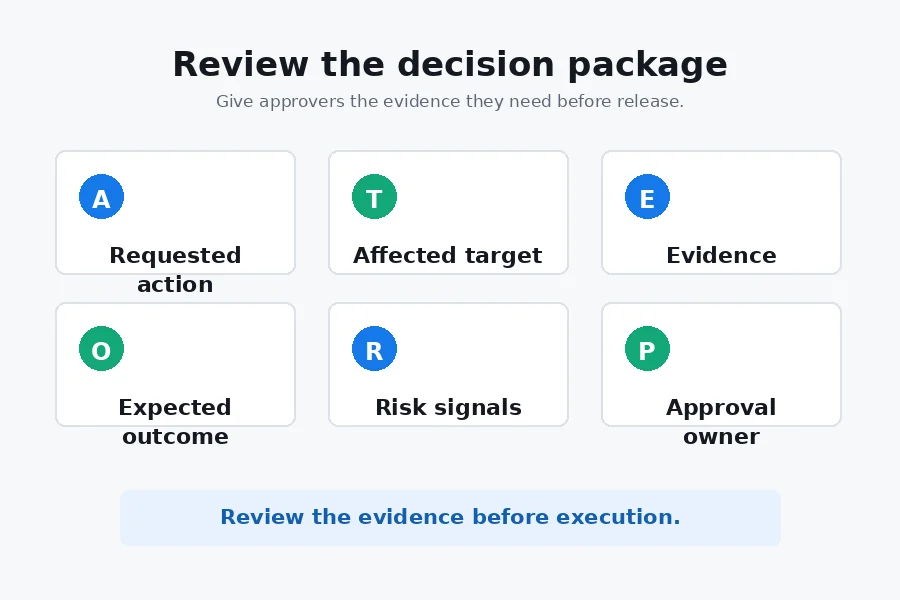
A reviewer should not have to reconstruct the agent’s reasoning from scattered logs. Put the decision package in one place. The package should state the requested action in plain language, show the exact tool call or change set, identify affected systems, and link the sources the agent used. It should also say what the agent is uncertain about. Hiding uncertainty makes review slower because people discover it only after opening the request.
- Requested action and a human-readable summary
- Target system, account, project, or customer affected
- Inputs and sources used, with timestamps where relevant
- Expected outcome and a rollback path
- Risk signals, policy matches, and confidence limits
- Approval owner, expiry time, and escalation route
For example, a cloud operations agent requesting a production configuration change should show the diff, the environment, the change window, the ticket that authorized the work, and the command it will execute. “Apply recommended fix” is not a reviewable request. It forces the human to guess what the system intends to do.
Design the approval request as a state machine
Approval logic becomes much easier to audit when it has explicit states. A request begins as proposed. It may move to waiting for review, approved, rejected, expired, executed, failed, or rolled back. Keep the request immutable after approval. If the agent changes the payload, creates a new request and send it through review again.
This prevents a subtle but serious failure: approving one action and executing another. Bind the approval to a hash of the structured payload, the policy version, and the target environment. When the executor receives the approval token, it verifies that all three still match. A stale token cannot be reused for a different command.
Use scoped permissions alongside approval
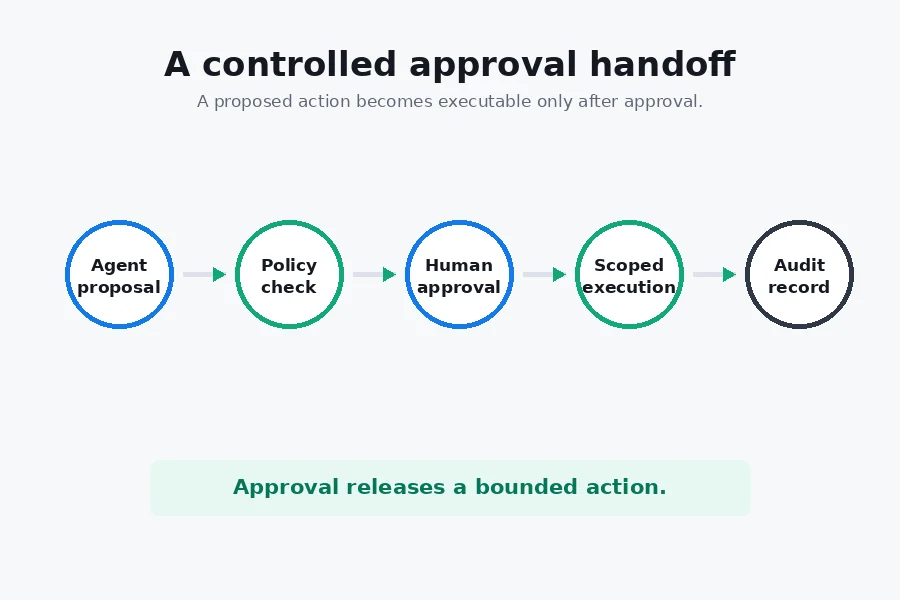
Approval alone is not enough if the agent’s service account can bypass the workflow. The executor should have only the permissions required for the approved action. Separate the planning identity from the execution identity when possible. The planner can read context and create requests. The executor can perform a narrowly defined operation only after it validates an approval token.
That arrangement also helps with prompt injection. An untrusted document might persuade an agent to attempt a dangerous command, but it should not be able to grant new permissions or skip an approval requirement. Treat external text as data, not as instructions with authority.
Common approval workflow mistakes
The most common mistake is a vague approval card. Reviewers see a short summary but not the actual action, then approve because the queue is growing. The fix is concrete evidence and a predictable layout. A second mistake is approval fatigue. If every low-risk task requires the same click, the process stops detecting risk. Move routine, reversible work into a policy lane and reserve people for exceptions.
Another problem is an approval that never expires. A request made during a maintenance window should not remain valid next week after the environment has changed. Set a short lifetime based on the action. A production deployment might need a thirty-minute window. A request to redact a record may need a new review if the record changes.
Finally, do not confuse an audit log with a wall of telemetry. A useful log answers who requested an action, who approved it, what ran, what changed, and whether rollback succeeded. Store raw technical traces separately, then link them from the event record.
Where SmaugBrain fits in the workflow
SmaugBrain can serve as the orchestration layer between an agent’s plan and the systems that carry out work. A practical workflow starts with an event: a new service ticket, a deployment request, a security alert, or a form submission. The agent collects approved context, prepares a structured proposal, and routes it to the right person or policy. After approval, a constrained action runs and writes the result back to the same case.
The value is not a claim that every process should be autonomous. It is that the handoff can stay coherent. The person who approves a change sees what the agent intends to do, and the person who investigates later can see the decision and the result in one workflow. Start with one narrow process, such as triaging access requests or drafting a response that cannot send until a manager releases it.
Explore SmaugBrain to evaluate an agent workflow around the tools and approval points your team already uses.
Implementation guide: build one safe path first
1. Choose a bounded use case
Pick a workflow with a clear input, an owner, and a measurable outcome. “Help with operations” is too broad. “Read an approved incident ticket, propose a status update, and wait for the incident commander before posting it” is narrow enough to test. Avoid giving the first version access to many systems at once.
2. Define the action contract
Write a schema for every action. The schema should include action type, target, parameters, justification, source references, risk level, and rollback instructions. Validate it before showing it to a reviewer. Structured requests make policy checks reliable and prevent an agent from slipping unreviewed prose into an execution path.
3. Route by risk and ownership
Map each action type to an approver or a policy. The system owner approves infrastructure changes. A support lead approves customer-facing exceptions. Finance owns refunds. When the primary owner is away, use an explicit escalation rule instead of sending every request to a shared inbox.
4. Execute with a fresh check
Right before execution, confirm that the request is still approved, unexpired, and unchanged. Check the current state of the target when that state matters. An agent may have proposed to assign a ticket to a queue, but a human could have already resolved the issue. The executor should stop rather than overwrite a newer decision.
5. Measure overrides and rejections
Rejections are useful data. Track why reviewers reject or edit agent proposals. Are source documents incomplete? Does the agent select the wrong risk tier? Is the request too long to scan? Review those patterns weekly, then improve the policy, prompt, integration, or source data. Do not tune solely for approval rate. A system that gets every request approved may be hiding a weak review process.
Examples by team
Customer operations: An agent reads a support case, gathers account history, and drafts a reply. Routine troubleshooting drafts can be sent to an internal queue. Refunds, account closures, and statements about legal obligations wait for a named approver. The final message and approval event remain attached to the case.
Cloud operations: An agent correlates an alert with recent deployments and proposes a rollback or scaling change. The approval view includes the affected environment, command, expected impact, and rollback. Emergency policies may allow a pre-approved runbook to execute automatically within tight limits, then notify the on-call engineer.
Security: An agent can enrich an alert with known indicators and recommend containment. Disabling a user, rotating a credential, or blocking network access should go through an accountable incident owner unless a pre-defined emergency policy applies. A record of the evidence matters because the action may affect an employee or customer.
FAQ
Do all AI agent actions need human approval?
No. Read-only work and reversible internal tasks can often run under a logged policy. Require approval where an action has material external impact, changes sensitive data, creates a financial or legal commitment, or cannot be easily undone.
How long should an approval stay valid?
Only as long as the proposed action remains safe to execute. Use a short expiry for production changes and actions that depend on a changing record. Require a new request when the payload, target, policy, or relevant system state changes.
What prevents an agent from changing an approved request?
Bind the approval to an immutable action payload. The executor checks the payload hash, policy version, expiry, and target before it runs. Any change creates a new request that needs its own review.
How do approval workflows reduce prompt injection risk?
They do not solve prompt injection by themselves, but they reduce the chance that a malicious instruction becomes an immediate high-impact action. Combine approval with least-privilege credentials, trusted source boundaries, tool allowlists, and execution-time validation.
What should an AI agent audit log contain?
Record the request, affected target, evidence, policy decision, approver, timestamps, executed command or API call, result, and rollback outcome. Link detailed traces instead of making the primary event record unreadable.
Make the human checkpoint useful
The best approval workflow is not a ceremonial pause before automation. It gives the right person enough context to make a quick, informed decision, while routine work stays out of their way. Build the process around explicit action classes, narrow permissions, immutable requests, and evidence that a reviewer can scan. Then expand only after the first workflow earns trust in real operations.
For teams building practical agent automation, the work begins with a small, controlled path. Decide what the agent may propose, what it may execute, and where a person must take responsibility. Those boundaries make automation easier to operate when the stakes rise.