
AI Agent Cost Control: Budgets, Token Limits, Tool Quotas, and Spend Monitoring
AI agent cost control is not simply a matter of choosing a cheaper model. An agent can plan, call tools, retrieve documents, retry failed steps, delegate work, and continue running after a user leaves the conversation. Each capability can improve the result, but each also creates another path for cost to grow. The practical goal is therefore not “use fewer tokens.” It is to give every workflow an explicit economic contract: how much it may spend, what value it must produce, when it should degrade gracefully, and when it must stop.
A reliable cost-control system combines four layers: per-request limits, per-tool quotas, workflow-level budgets, and team-level monitoring. These controls should be designed alongside quality and safety controls rather than added after a surprising invoice. This guide explains how to build that system for cloud AI agents, including the metrics, thresholds, fallback policies, and review process needed for production use.
Why AI agent costs are harder to predict than chatbot costs
A chatbot usually has one input and one model response. An agent has a loop: it may inspect context, plan, call a search service, read pages, revise, invoke another model, and retry a failed operation. One task therefore combines many dependent decisions, not one API request.
- Context growth: conversation history, retrieved documents, tool results, and intermediate reasoning can expand on every step.
- Variable tool usage: browser automation, code execution, image generation, databases, and third-party APIs have different billing models.
- Retries and recovery: transient failures can multiply model and tool calls unless retry policies are bounded.
- Delegation: subagents can reduce latency through parallel work while increasing total consumption.
- Long-lived execution: scheduled and background tasks can accumulate spend without a user watching each decision.
This variability calls for a controlled system. OpenTelemetry generative AI semantic conventions provide a useful direction: capture model operations, token usage, tool calls, latency, errors, and trace relationships consistently. The NIST AI Risk Management Framework adds governance: risks should be mapped, measured, managed, and reviewed throughout the lifecycle. Uncontrolled resource use can become an operational and business risk.
Build a four-layer budget model
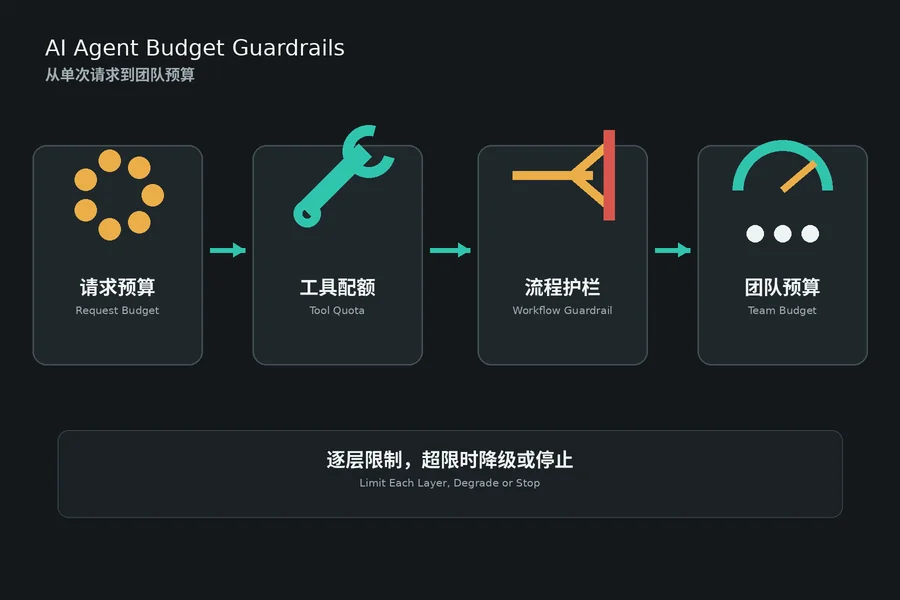
The strongest controls are layered. A single monthly cap is too late: it tells you the account spent too much but does not explain which task, user, tool, or loop caused the problem. A token limit alone is also incomplete because an inexpensive model call can trigger an expensive external action. Use four scopes that reinforce one another.
1. Request budget
Set maximum input tokens, output tokens, latency, and estimated monetary cost for one model request. Select the smallest context that preserves the evidence required for the current decision. Summaries, structured state, and retrieval filters are usually more effective than repeatedly sending an entire transcript. For practical context-reduction patterns, see the AI agent memory management guide.
2. Tool-call budget
Give every tool a call count, time limit, and cost classification. A read-only metadata lookup may be cheap and low risk; browser automation, image generation, or a paid data provider may deserve a strict quota. Count both successful and failed attempts. Otherwise a failing dependency can consume the budget while producing no usable output.
3. Workflow budget
Define the maximum total spend, number of steps, retries, wall-clock duration, and delegated tasks for one business outcome. The agent should evaluate remaining budget before each expensive action. When the remaining budget cannot support the next step, it must choose a cheaper path, ask for approval, return a partial result, or stop with a clear reason.
4. Team and period budget
Aggregate usage by workspace, project, customer, workflow type, environment, and day or month. This layer supports forecasting and accountability. It should also protect essential workloads from noisy experiments. Separate production, development, and evaluation budgets so that test runs cannot exhaust the capacity needed by customer-facing automation.
| Control scope | Primary limits | Best response when exceeded |
|---|---|---|
| Model request | Input, output, latency, estimated cost | Trim context or use a smaller model |
| Tool | Calls, duration, paid units, retries | Use cache, alternate source, or stop tool |
| Workflow | Total spend, steps, elapsed time, subagents | Degrade, request approval, or return partial result |
| Team or period | Daily/monthly spend and rate of change | Throttle nonessential workloads and alert owner |
Set per-request budget: measure, trim, and enforce limits
The request budget is the most granular control. Every model call should be preceded by a measurement of the current context size and an estimate of the expected output. If the projected cost exceeds the allowable budget for this request type, the agent should reject the prompt, trim the context, or route to a smaller model before the call is made.
Context budgeting
The single largest source of waste in agent workflows is context growth without a corresponding quality gain. Strategies: 1) use a sliding window of recent messages rather than the full history, 2) summarise old context into a concise state object, 3) apply retrieval filters to ensure only relevant documents are included, 4) trim tool outputs to the relevant excerpt. The memory management guide covers each technique with concrete size comparisons.
Output limiting
Set an explicit max_tokens parameter on every model call. Require the output to be a structured format (JSON, code block, or short summary) rather than an open-ended response. Use concise output instructions for deterministic tasks, such as asking for the tool call or schema-compliant object without additional explanation. Measure the effect on a representative test set before adopting the change broadly.
Model routing
Route simple lookups and formatting tasks to a fast, inexpensive model. Reserve a stronger model for work that demonstrably needs deeper reasoning, planning, or code generation. Evaluate routing decisions against a fixed quality test set and compare both completion quality and total workflow cost before changing production defaults.
Tool invocation budget: quota, cache, and cost classification
Tools are often the second-largest cost driver after model calls, and they are harder to control because they involve external services. A tool that costs one cent per call is negligible in isolation, but a loop that calls it 50 times per task is not. Budget every tool independently.
Cost classification
Classify every tool as cheap, moderate, or expensive. Cheap tools (read-only database queries, local file reads, arithmetic) need no approval. Moderate tools (web searches, image generation, code execution) should check the remaining workflow budget before each call. Expensive tools (paid API calls, long-running browser automation, bulk data exports) should require explicit approval inside the workflow.
Caching strategy
Cache deterministic results. A tool that reads the same customer record or the same web page multiple times during one workflow should return the cached result after the first call. The cached period should be short enough to reflect live data, but long enough to save repeated calls within the same task. For retry strategies that avoid redundant tool calls, see the retry strategies guide.
Retry budget
Every retry consumes budget. Configure a retry budget that is separate from the successful-call budget: a maximum of N retries per tool call, a maximum total time for retries, and a fallback path when the budget is exhausted. Transient infrastructure failures should be retried once or twice; persistent logical errors should not be retried at all. The retry strategies guide explains the distinction between retryable and non-retryable failures.
Workflow budget: graceful degradation and approval gates
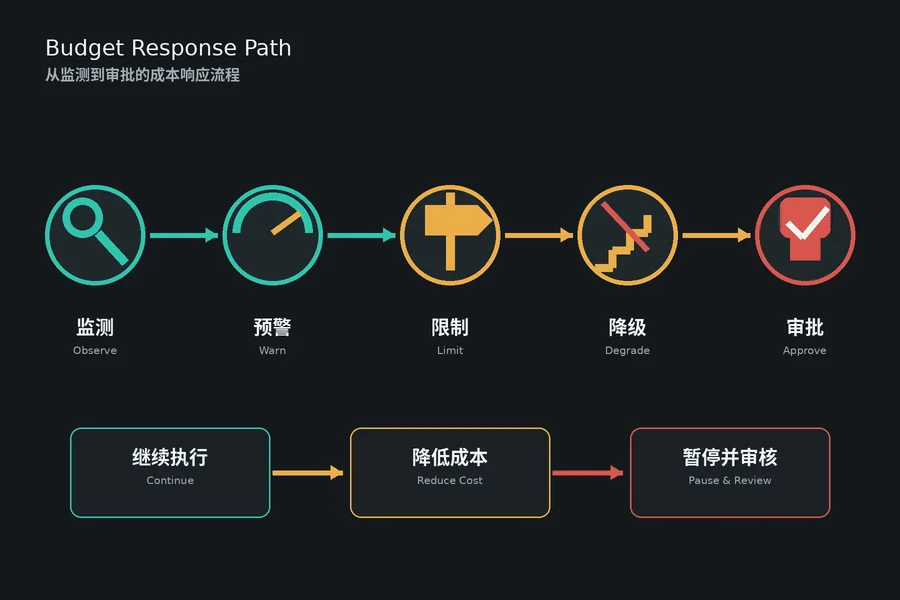
The workflow budget is the economic contract between the user and the agent. Before the workflow starts, the user or the system defines how much the task may cost. The agent checks the remaining budget before each expensive step. When the budget is nearly exhausted, the agent has three options: degrade, request approval, or return a partial result.
Degradation path
Instead of failing when the budget runs out, the agent should attempt a cheaper version of the same task. Use a less expensive model, use a shorter context, skip optional tools, or produce a summary instead of a full report. The degradation path should be defined in the workflow specification so that the agent can switch to it automatically.
Approval gates
For workflows that exceed a defined cost threshold, pause and request approval before continuing. This is similar to the approval patterns used in permission management. The approval workflow guide describes how to implement gates that are triggered by both cost and risk criteria, with evidence presented to the approver before the agent proceeds.
Team monitoring: dashboards, alerts, and cost allocation
The fourth layer is monitoring. Individual budgets cannot prevent cost problems if nobody reviews the aggregated data. The monitoring system should combine real-time dashboards for operational decisions and periodic reports for strategic planning.
Metrics to track
- Total spend per workflow, per environment, and per workspace. This is the primary allocation metric.
- Cost per action type: model calls, tools, retrieval, generation, and delegation.
- Cost per decision outcome: successful task, failed task, abandoned task, and retry loop.
- Cost per user: aggregate across all workflows initiated by the same user, team, or system account.
- Rate of change: daily, weekly, and monthly cost growth to detect trends before they become surprises.
Alert thresholds
Set alerts at three severity levels. Informational: weekly spend exceeds 70 percent of the monthly budget. Warning: daily spend exceeds 10 percent of the monthly budget. Critical: any single workflow exceeds its individual budget or a new workflow type is running without a budget. Critical alerts should block the workflow until the budget is approved.
Cost allocation
Tag every API call, tool invocation, and delegation with a workflow ID, workspace ID, environment, and user ID. This tag set enables accurate cost allocation and chargeback. It also makes it possible to compare the cost of the same workflow across versions and detect drift when a model upgrade or a code change makes the workflow more expensive without improving quality.
Common pitfalls in AI agent cost control
Several patterns appear repeatedly in production environments. Each is avoidable with the right controls in place.
- Pitfall: unlimited retry loops. An agent stuck on a failing tool call can retry indefinitely. Block with retry budget and a circuit breaker.
- Pitfall: silent context expansion. Each step adds the previous step’s output to the history. Cap the context window and summarise old content.
- Pitfall: delegation without a budget. A subagent inherits no budget from the parent. Pass the remaining budget to every subagent.
- Pitfall: ignored tool failures. A tool returns an error, but the agent retries and consumes more budget. Differentiate transient from permanent errors.
- Pitfall: background tasks without monitoring. A scheduled task that works fine in development can cost much more in production with real data. Enforce the same controls on background and foreground tasks.
Frequently asked questions about AI agent cost control
When should I use a token limit versus a monetary budget?
Use both. A token limit is more precise for model calls, but a monetary budget is easier to align with business expectations. Convert the token limit to a monetary estimate at the start of the workflow and check the monetary budget before each expensive step.
Can cost control degrade quality?
Yes, if the controls are too strict. The layered approach minimises this risk: degrade only the scope that is over budget rather than cutting everything. The model routing layer also preserves quality for the tasks that need the expensive model.
How do I handle a user who needs expensive tools?
Budget the user’s workflows separately. If the user consistently exceeds the standard budget, move the workflow to a higher-cost tier with explicit approval. The approval gate pattern from the approval workflow guide works well for this scenario.
Should I use one model for everything to keep costs simple?
No. Routing different tasks to different models reduces cost without reducing quality. The routing layer is a small engineering investment that pays for itself.
How often should I review the cost metrics?
Review dashboards daily for operational alerts and monthly for budget forecasting. The rate of change metric is the most informative single number: a sudden spike is more actionable than a high absolute value that has been stable for weeks.
What is the cheapest way to test a new workflow?
Use a development environment with strict per-request budgets, the smallest model that can complete the task, and a fixed number of steps. Measure the cost of 10 successful runs and multiply by your expected volume before moving to production. This prevents the first production invoice from being a surprise.
Can I automate cost control without human oversight?
You can automate the enforcement layer (budget checks, model routing, context trimming, tool caching) but the escalation layer — approval gates, budget increases, and degradation path selection — should involve a human reviewer. The automated system enforces policy; the human makes exceptions.
Get started with SmaugBrain cost controls
Use SmaugBrain to turn this framework into an explicit workflow contract: define the budget, permitted tools, retry ceiling, approval points, and verification evidence before unattended execution. Start with a narrow, measurable use case and review cost alongside quality after each test run. Explore cloud AI agent workflows at https://www.smaugbrain.com/.